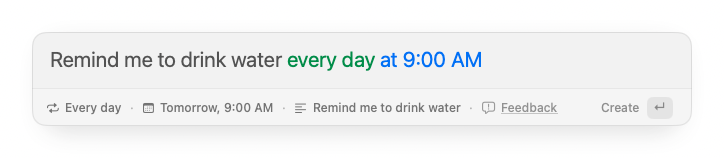
A lightweight reminder app for Mac should do one thing especially well: let you capture a reminder quickly, then get out of your way. For many people, the real problem is not organizing a huge task system. It is much smaller: you remember something while you are working, you need to capture it before it disappears, and you want to return to your current workflow without being pulled into another app.
That is the workflow Remindy is built for. It is a lightweight reminder app for Mac that opens like a quick command bar, understands natural language timing in 10 languages, supports recurring reminders, and keeps reminder creation short enough that it does not become its own interruption.
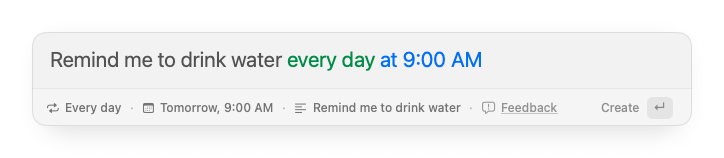
This guide explains what to look for in a lightweight Mac reminder app, when Apple Reminders is enough, when a full task manager is too much, and why a keyboard-first reminder bar can be a calmer option for everyday follow-ups.
What makes a lightweight reminder app useful?
A lightweight Mac reminder app should help you capture time-sensitive thoughts before they turn into mental clutter. That sounds simple, but the details matter.
A good lightweight reminder app should be:
- fast enough to open from anywhere;
- easy to use without rearranging your workspace;
- good at natural language input like “tomorrow at 9am”;
- flexible enough to understand reminders in multiple languages;
- flexible enough for recurring reminders;
- lightweight enough for small personal follow-ups;
- private enough that reminder content does not need to live in another account;
- predictable when notifications arrive.
Many productivity apps are optimized for projects, lists, boards, collaboration, priorities, labels, and planning. Those features can be useful, but they can also make simple reminders feel heavier than they need to be.
If your goal is to remember “call Alex at 3”, “take a break in 20 minutes”, “pay rent every month”, or “follow up next Friday”, speed matters more than project management.
The problem with turning every reminder into a task
Most people do not need a full task workflow for every small thing. A reminder is often just a moment in time.
For example:
- “Start the laundry in 30 minutes”
- “Check the oven at 6:15”
- “Submit the weekly report every Friday at 5pm”
- “Cancel the trial next Tuesday”
- “Message Sam tomorrow morning”
- “Stand up and stretch every hour”
These are not projects. They do not need kanban boards, custom fields, planning views, or complex inbox triage. They need one thing: a reliable alert at the right time.
When reminder capture feels too heavy, people stop using the system. They leave browser tabs open, send messages to themselves, rely on memory, or create sticky notes that become background noise.
A lightweight reminder app fixes that by making the capture moment almost invisible.
Why quick capture matters on Mac
On Mac, context switching is expensive. You may be writing, coding, presenting, studying, or sitting in a meeting when a reminder comes to mind. If capturing that reminder requires opening a large app, choosing a list, setting a date picker, and filling in fields, the reminder tool becomes another interruption.
Quick capture works better because it keeps the interaction short:
- Open the reminder bar.
- Type the reminder naturally.
- Press Enter.
- Return to work.
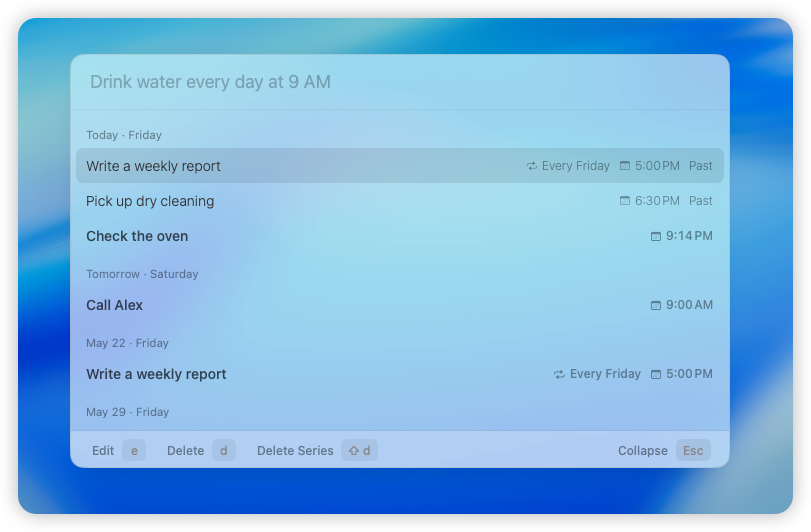
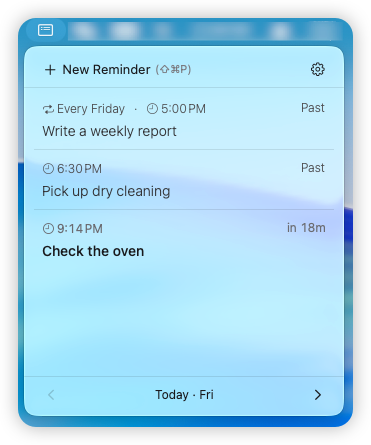
That is the core Remindy workflow. It behaves more like a Spotlight-style input than a traditional task manager. You can stay in the flow of your work and still trust that the reminder is scheduled.
Natural language reminders reduce friction
Date pickers are precise, but they are rarely the fastest way to create reminders. People think in phrases:
- “in 20 minutes”
- “tomorrow at 9am”
- “next Friday afternoon”
- “every weekday at 10”
- “monthly on the 1st”
- “tonight at 8”
A natural language reminder app lets you type the timing the way you already think. Instead of opening several controls to choose a date, time, and repeat rule, you can put everything into one sentence.
For a quick reminder app, this is one of the clearest friction reducers. The app should understand both the reminder text and the timing without making you manually separate them every time.
Remindy is designed around that style of input. You can type a normal phrase, let the app detect the schedule, and create the reminder without turning it into a form-filling exercise.
Type reminders in the language you already use
Natural language input is more useful when it works in the language you actually think in. Remindy currently understands reminder input in 10 languages:
- English
- Japanese
- German
- French
- Spanish
- Korean
- Chinese
- Italian
- Portuguese
- Russian
That means you can type reminders in a familiar way instead of translating every small reminder into a rigid app format. If you switch between languages during the day, Remindy can still keep the capture step short: type the reminder, confirm the detected time, and move on.
The app interface is currently English, but Remindy understands reminder input in these 10 languages. For a lightweight reminder workflow, that matters because the fastest reminder is usually the one you can write without stopping to rephrase it.
Recurring reminders should be simple
Recurring reminders are where many small systems break down. Daily habits, weekly reviews, monthly payments, and repeating chores should not require a complex setup.
Useful recurring reminder examples include:
- “water plants every Sunday morning”
- “review budget every month on the 1st”
- “take medication every day at 8am”
- “write weekly report every Friday at 5pm”
- “clean desk every Monday morning”
A lightweight recurring reminder app for Mac should make repeat patterns easy to create and easy to trust. You should not have to rebuild a routine every week, and you should not need a full task manager just to remember something that repeats.
Apple Reminders vs a lighter reminder workflow
Apple Reminders is a strong default option, especially if you want iCloud sync, shared lists, Siri support, and a familiar Apple interface. For many people, it is enough.
But Apple Reminders can still feel like a list-based app. If your main need is fast capture while working on Mac, you may want a tool that opens instantly and focuses only on the reminder creation moment.
Here is a simple way to think about it:
| Need | Natural fit |
|---|---|
| Shared family lists | Apple Reminders |
| iCloud sync across devices | Apple Reminders |
| Project-style task organization | A task manager |
| Quick reminders while working on Mac | Remindy |
| Natural language capture in multiple languages | Remindy |
| Lightweight recurring routines without account setup | Remindy |
This is not about replacing every productivity tool. It is about choosing the right tool for the job. A reminder app should reduce friction, not ask you to reorganize your life before it can remind you to do one small thing.
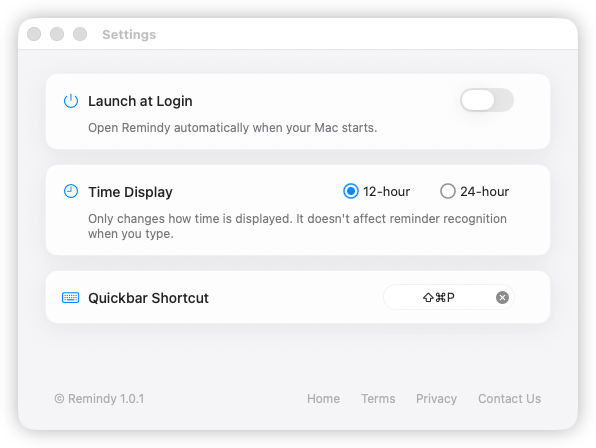
Remindy keeps the settings surface small too: launch at login, choose a time display style, and set the quickbar shortcut you want to use from anywhere.
Privacy matters for personal reminders
Reminders can contain private details: names, medication, errands, appointments, financial follow-ups, personal routines, and work-related notes.
That is why a local-first reminder app can be appealing. Remindy does not require an account or cloud sync. Reminder content is designed to stay on your Mac, and natural language parsing is designed to happen locally inside the app.
For people who mostly need reminders on the Mac they are already using, that keeps the workflow simple:
- no account to create;
- no cloud workspace to manage;
- no shared task database;
- no reminder content sent away for basic parsing.
If you want sync everywhere, a cloud-based reminder system may be a better fit. If you want quick local reminders while you work on Mac, a local-first approach is often calmer.
When a lightweight reminder app makes sense
Remindy is especially useful when your reminders are small, frequent, and time-based.
It fits workflows like:
- setting a quick reminder during deep work;
- creating a follow-up reminder during a meeting;
- scheduling recurring personal routines;
- capturing errands without opening a task manager;
- reminding yourself to check something later today;
- keeping small obligations out of your head.
It is less about planning your entire week and more about removing tiny memory burdens from the workday.
A practical Mac reminder workflow
Here is a simple workflow that works well with a quick reminder app:
- Use your main calendar for appointments and events.
- Use a task manager only for larger projects.
- Use Remindy for small time-based reminders that should be captured immediately.
For example, while writing an email you might remember that you need to check a package tomorrow. Instead of stopping to open a list app, you can open Remindy and type:
check package status tomorrow at 10am
While working through a coding session, you might type:
restart local build in 20 minutes
Before a weekly routine, you might type:
submit timesheet every Friday at 4pm
The point is not to build a perfect productivity system. The point is to remove one small thing from your head quickly and reliably.
What to avoid in a lightweight reminder workflow
When choosing a reminder app for Mac, watch for friction that makes reminders harder to create:
- too many required fields;
- slow launch time;
- unclear notification behavior;
- recurring reminders hidden behind complex menus;
- account requirements for local personal reminders;
- project management features you do not need;
- capture flows that interrupt your current work.
A reminder tool should fit the moment when you remember something. If the tool adds more overhead than the reminder itself, people naturally stop using it.
Why Remindy exists
Remindy exists because many reminders are not tasks. They are quick promises to your future self.
You should be able to type naturally, create the reminder, and move on. No account. No complex workspace. No full task management ritual. Just a fast Mac reminder bar for the small things that would otherwise stay in your head.
If you are looking for a reminder app for Mac that is lightweight, keyboard-first, multilingual, natural-language friendly, and built for recurring reminders, Remindy is designed for exactly that workflow.
Frequently asked questions
What is a lightweight reminder app for Mac?
A lightweight reminder app for Mac is a small tool for capturing time-based reminders without turning them into a full task management workflow. Apple Reminders is a strong default for synced lists and shared reminders. Remindy is designed for quick, lightweight reminder capture from a keyboard-first Mac app without account setup or a full task manager.
Does Remindy support natural language reminders?
Yes. Remindy supports natural language reminder input such as “in 20 minutes”, “tomorrow at 9am”, “next Friday afternoon”, and recurring patterns.
Does Remindy support multiple languages?
Yes. Remindy currently understands reminder input in 10 languages: English, Japanese, German, French, Spanish, Korean, Chinese, Italian, Portuguese, and Russian. The app interface is currently English.
Does Remindy support recurring reminders?
Yes. Remindy supports recurring reminders for routines like daily, weekly, monthly, and other repeating schedules.
Is Remindy a task manager?
No. Remindy is intentionally lighter than a task manager. It is built for quick reminders, recurring routines, and time-based follow-ups rather than large projects, lists, boards, or collaboration workflows.
Does Remindy require an account?
No. Remindy does not require an account or cloud sync. It is designed as a local-first reminder app for Mac.
Is Remindy free?
Yes. Remindy is currently free to download, with no Pro plan and no subscription.