A quick reminder app for Mac

Remindy is a Spotlight-style reminder bar for Mac.
A keyboard-first way to type naturally, create recurring reminders, and stay focused without the overhead of a full task management app.

  1. 1 Summon Remindy
  2. 2 Type naturally
  3. 3 Get reminded
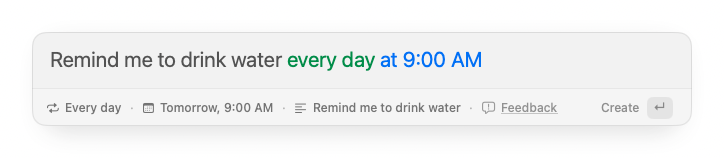
Remindy quick bar for creating reminders on Mac
Download Remindy

Completely free. No Pro plan, no subscription.

How it works

Open. Type. Enter. Done.

Type naturally in 10 languages English Japanese German French Spanish Korean Chinese Italian Portuguese Russian . Remindy understands the timing, schedules the reminder, and gets out of your way.

Pick up dry cleaning this Friday at 6:30 PM
毎週金曜日午後5時に週報を書く

Reminder content stays local. No account. No cloud sync.

1

Open from anywhere

Bring up the reminder bar with a global shortcut.

2

Type naturally

Use natural phrases like “in 20 minutes”, “tomorrow at 9am”, or “next Friday afternoon”.

3

Get back to work

Press Enter. Remindy schedules the reminder and closes instantly.

Blog

Reminder workflows for Mac

Practical notes on quick reminders, recurring routines, natural language input, and lighter ways to stay on track without turning every reminder into a task.

Also from us

More tiny Mac tools for focused work

Remindy helps you capture reminders quickly. Floaty keeps reference windows visible, and Cloaky covers private or distracting screen areas when you are sharing, recording, or working in public.

Frequently asked questions

Need more details or have a question? Email support@remindytool.com for support.

What is Remindy for?

Remindy is a keyboard-first reminder app for Mac, built for quick reminders, recurring routines, and everyday follow-ups that should not turn into a full task management system.

Can I type reminders naturally?

Yes. Type phrases like “in 20 minutes”, “tomorrow at 9am”, or “next Friday afternoon”. Remindy detects the timing and schedules the reminder.

Does Remindy support recurring reminders?

Yes. Remindy supports repeating reminders such as daily, weekly, monthly, and other recurring patterns.

Do I need an account or cloud sync?

No. Remindy does not require an account or cloud sync. Reminder content stays local on your Mac.

Does Remindy support multiple languages?

Yes. Remindy understands reminder input in 10 languages English Japanese German French Spanish Korean Chinese Italian Portuguese Russian , so you can type reminders in the language you already use. The app interface is currently English only.

Does Remindy collect reminder content?

No. Reminder content stays on your Mac. Anonymous analytics and crash reports may be used to improve the app, but reminder content is never collected.

Remindy for Mac

Set reminders quickly, then get back to work

Remindy is a lightweight Mac app for quick reminders, recurring routines, and everyday follow-ups without turning them into a task management system.

Download Remindy