If you are looking for the best reminder app for Mac, the real question is usually not “which app has the most features?” It is “which app makes reminders easiest to capture when I am busy?”
For many Mac users, Apple Reminders is the default answer. It is built in, syncs well across Apple devices, and works for shared lists, grocery items, and everyday planning. But some people are not actually looking for a list manager. They are looking for a faster way to set small, time-based reminders while they work.
That is where a quick reminder app for Mac can make more sense. Instead of opening a full app, choosing a list, and filling out fields, you open a small reminder bar, type naturally, press Enter, and keep going.
This guide compares Apple Reminders with a lighter reminder workflow, explains when each one fits, and shows why a keyboard-first reminder tool can be a better option for quick capture and recurring alerts. If you are still deciding whether this category even makes sense for you, our guide to lightweight reminder apps for Mac is a helpful starting point.
Apple Reminders is good, but it solves a different problem
Apple Reminders is strong when you want a general-purpose reminder system that is connected to the rest of the Apple ecosystem.
It is especially useful for:
- shared family or team lists;
- iPhone, iPad, and Mac sync through iCloud;
- Siri-based reminder capture;
- list organization with sections and smart lists;
- reminders connected to location, flags, and broader planning.
For a lot of people, that is enough. If your reminders are mostly list-based and you want them across all your Apple devices, Apple Reminders is a very practical choice.
But many reminders are not really list items. They are quick prompts to your future self:
- “check the oven in 25 minutes”
- “follow up with Alex tomorrow at 10”
- “submit weekly report every Friday at 5pm”
- “cancel the trial next Tuesday”
- “stretch every hour”
Those do not always need a larger reminder system. They just need to be captured quickly and triggered at the right time.
The friction usually appears at the capture step
The hardest part of using any reminder tool is not the reminder itself. It is the moment you remember something while doing something else.
You might be:
- writing code;
- answering email;
- joining a meeting;
- studying;
- designing;
- doing focused work where even a small interruption costs attention.
If capturing a reminder takes too many steps, people delay it, forget it, or leave themselves a messy workaround like an unread email, a sticky note, or a browser tab they plan to revisit later.
That is why quick capture matters so much on Mac.
A lighter reminder workflow looks more like this:
- Open a reminder bar with a shortcut.
- Type the reminder naturally.
- Press Enter.
- Return to what you were doing.
The reminder is handled, and your attention stays mostly intact.
Apple Reminders vs a quick reminder app
Here is the simplest way to think about the difference:
| Need | Better fit |
|---|---|
| Shared household lists | Apple Reminders |
| Cross-device sync with iCloud | Apple Reminders |
| Siri capture | Apple Reminders |
| Project-style task organization | Apple Reminders or a task manager |
| Fast reminder capture while working on Mac | Quick reminder app |
| Keyboard-first workflow | Quick reminder app |
| Natural language reminders typed in one line | Quick reminder app |
| Lightweight recurring reminders without account setup | Quick reminder app |
This is why some people search for an Apple Reminders alternative on Mac even when Apple Reminders is already installed. They are not necessarily unhappy with it. They just want a faster capture experience for a different kind of reminder.
Why a keyboard-first reminder app can feel better
When people say they want a lightweight reminder app for Mac, they usually mean a tool that does not pull them into another workspace.
A keyboard-first reminder app helps because it:
- opens instantly from anywhere;
- avoids heavy navigation and menus;
- lets you type timing the way you already think;
- handles one-time and recurring reminders quickly;
- disappears as soon as the reminder is created.
That workflow is closer to Spotlight than to a traditional list app. It is especially useful for small reminders that happen during work, not during a weekly planning session.
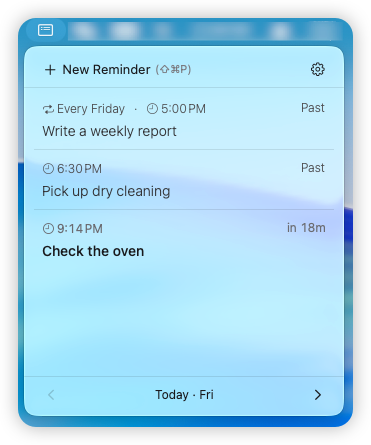
Remindy is built around that exact use case. It opens like a quick command bar, understands natural language timing, supports recurring reminders, and is designed to stay out of your way once the reminder is scheduled.
Natural language makes reminder capture faster
One of the biggest reasons people look for the best reminder app for Mac is that manual date and repeat setup gets old fast.
Most people do not think in calendar controls. They think in phrases like:
- “in 20 minutes”
- “tomorrow at 9am”
- “next Friday afternoon”
- “every weekday at 10”
- “monthly on the 1st”
- “tonight at 8”
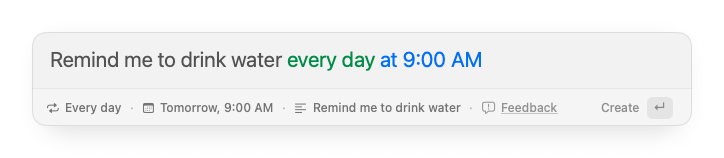
Natural language reminders reduce that friction because you can type the reminder and the timing together. No extra form-filling. No separate repeat-rule flow for every simple recurring prompt.
Remindy is designed around this kind of input, including recurring reminders and multilingual reminder entry. If your goal is speed, natural language is one of the clearest workflow upgrades you can make.
Recurring reminders are where lightweight tools prove their value
One-time reminders are useful, but recurring reminders are where a lot of reminder tools become either powerful or annoying.
Examples include:
- paying rent every month;
- taking medication every day at 8am;
- writing a weekly report every Friday afternoon;
- checking backups every Monday;
- watering plants every Sunday morning.
If these reminders take too much effort to create, people often skip them or recreate them manually over and over.
A good recurring reminder app for Mac should make repeating schedules feel nearly as easy as one-time reminders. That is especially true if you set a lot of small personal routines and follow-ups that do not belong in a larger task manager.
If recurring schedules are the main thing you care about, you can also read our step-by-step guide on how to set recurring reminders on Mac.
Privacy and simplicity matter too
Another reason people search for a lightweight Apple Reminders alternative is that they do not always want another account, workspace, or cloud layer for simple personal reminders.
Remindy takes a local-first approach:
- no account required;
- no cloud sync required;
- reminder content stays on your Mac;
- natural language parsing is designed to happen locally.
That will not fit everyone. If you need reminders everywhere on every device, a synced solution may be the better match. But if you mostly need fast reminders while working on your Mac, local-first can feel calmer and simpler.
When Apple Reminders is the right choice
Apple Reminders is probably the right fit if:
- you want reminders on Mac, iPhone, and iPad automatically;
- you use shared lists with family or coworkers;
- you like organizing reminders into lists and smart views;
- you rely on Siri often;
- you want one built-in system for many types of reminders.
There is nothing wrong with using Apple Reminders. It is a solid app. The key is just understanding what kind of workflow you actually need.
When a quick reminder app is the better fit
A quick reminder app for Mac is probably the better fit if:
- most of your reminders happen while you are already working;
- you want to capture reminders with a keyboard shortcut;
- you want to type reminders naturally in one line;
- you care more about speed than list management;
- you set lots of recurring reminders for personal routines;
- you do not want to create an account for a small local tool.
This is the use case Remindy is designed for. It is not trying to replace project management software or become a giant productivity suite. It focuses on quick, time-based reminders that should take only a few seconds to create.
A practical workflow that works for many people
You do not have to choose one app for everything.
A simple setup can be:
- Use Calendar for events and appointments.
- Use Apple Reminders or a task manager for larger lists and projects.
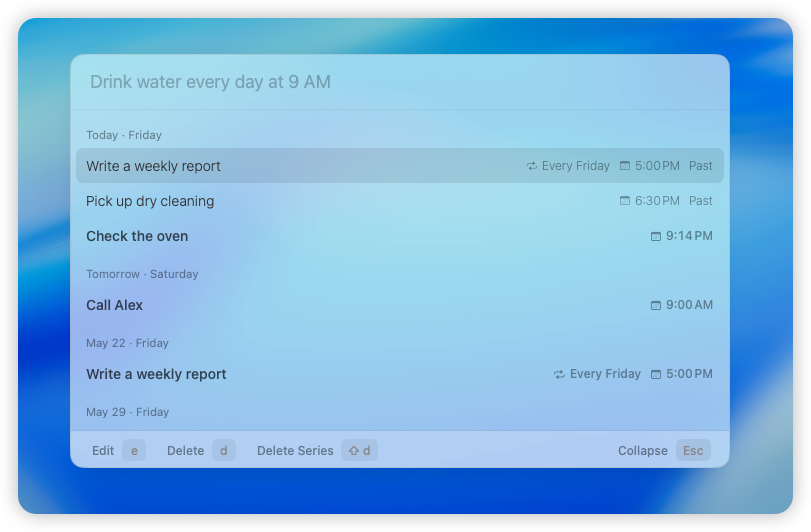
- Use a quick reminder app like Remindy for small time-based reminders you need to capture immediately.
That split works well because it matches the tool to the job. Not every reminder needs to become a managed task, and not every task should become a quick pop-up reminder. It is also close to the workflow we describe in our longer article on lightweight reminders on Mac.
So what is the best reminder app for Mac?
There is no single best reminder app for every Mac user.
Apple Reminders is one of the best built-in options for synced, list-based reminders across Apple devices. A quick reminder app is often better if your real problem is fast capture, natural language input, and recurring prompts that should not interrupt your workflow.
If you want a reminder app that opens quickly, works from the keyboard, supports natural language input in 10 languages, handles recurring reminders, and keeps everything local on your Mac, Remindy is built for that lighter workflow.
If that sounds like the way you actually work, you can read our guide to lightweight reminders on Mac, compare it with our post on recurring reminders on Mac, or download Remindy and try it for yourself.
Frequently asked questions
Is Remindy an Apple Reminders replacement?
Not completely. Apple Reminders is better for shared lists, iCloud sync, and broader reminder management across Apple devices. Remindy is better for quick reminder capture on Mac, especially when you want a keyboard-first workflow and lightweight recurring reminders.
What is the best reminder app for Mac for quick capture?
If you want fast reminder capture while working on your Mac, a quick reminder app is usually a better fit than a larger list-based app. Remindy is designed specifically for that use case.
Does Remindy support recurring reminders?
Yes. Remindy supports recurring reminders for daily, weekly, monthly, and other repeating schedules.
Can I type reminders naturally?
Yes. Remindy supports natural language reminders like “in 20 minutes”, “tomorrow at 9am”, and recurring phrases like “every Friday at 5pm”.
Does Remindy require an account?
No. Remindy does not require an account or cloud sync. It is designed as a local-first reminder app for Mac.